Available Tools And Functions in Simulator
Available Tools And Functions in Simulator
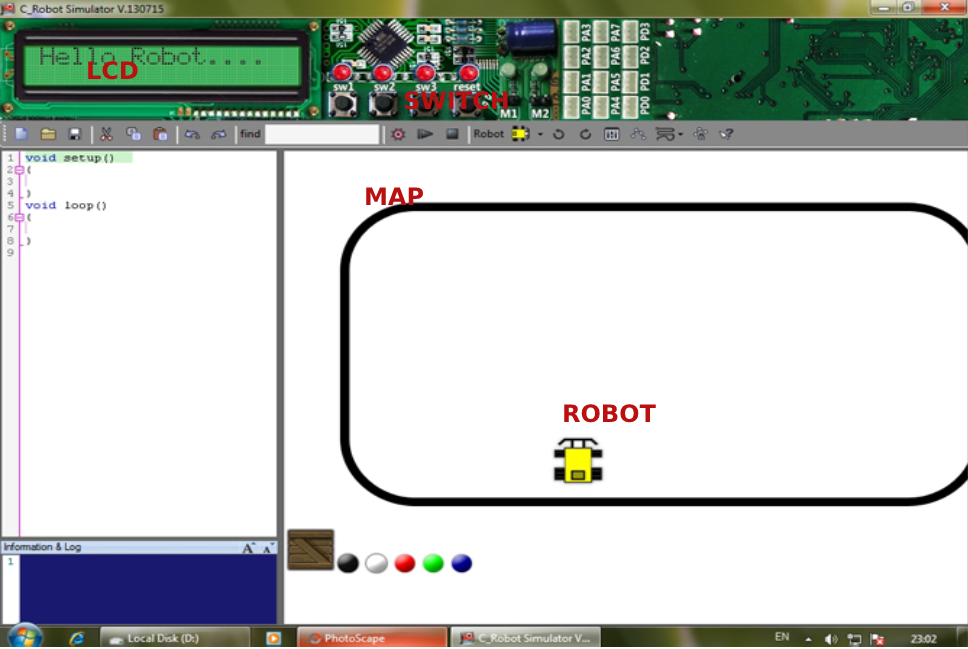
The tools available inside simulator are :
- Display
- Switches
- Wheel Based Mobile Robot
- Areana/Maps
Program Structure
void setup()
{
	// setup task goes here
}

void loop()
{
		// loop task goes here
}
Builtin Functions Available
System
System functions and instructions for delaying and stopping the robot system
void sleep (int t); 	Delay time t milliseconds
void system_stop (); 	Stop the whole robot
LCD
lcd function and instruction set for creating numeric message display on the LCD screen
lcd ("Hello robot");
// Show Hello robot message via LCD screen

lcd ("Value =% d", i);
// Display the text Value = (variable value i) via the LCD screen

lcd ("Value1 =% d Value2 =% d", i, j);
Example
void setup()
{
    //Data display format, text type and various variables
    int a=2;
    lcd("int value is %d ",a);

}
void loop()
{

}
Input
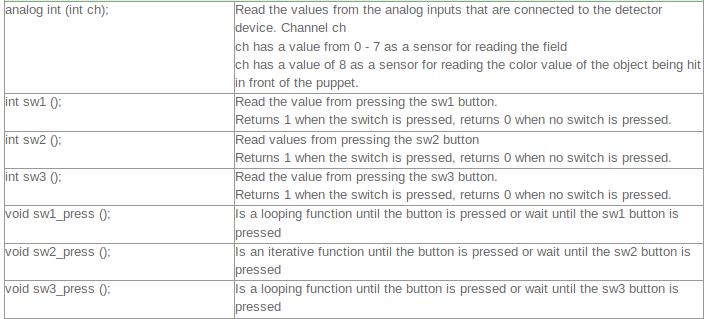
Function and instruction set for reading values from analog inputs connected to the detector and switch buttons
//code to dispaly sensor value in lcd
int pa1=0;

void setup()
{

}
void loop()
{
    pa1=analog(1);
    lcd("value of sensor pa1=%d",pa1);
}
Motor
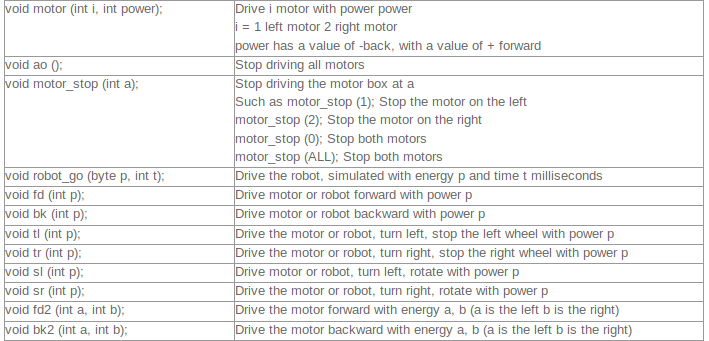
Function and instruction set for driving DC motor or controlling the robot's wheel